Space Shuttle: Unterschied zwischen den Versionen
(→Bilder / Videos) |
(→Images MK-2) |
||
| (47 dazwischenliegende Versionen desselben Benutzers werden nicht angezeigt) | |||
| Zeile 1: | Zeile 1: | ||
| − | Features | + | == Features == |
| − | Features | + | ==== Features implementiert ==== |
| + | * Live-Video-Streaming | ||
| + | * Multitouch Webinterface | ||
| − | Features in | + | ==== Features in Entwicklung ==== |
| + | * 360 Grad LIDAR (Lidar light v1) Platform. Bis zu 100 Messungen pro Sekunde müssten möglich sein. | ||
| − | + | ==== Features in Planung ==== | |
| + | * Indoor GPS mit Ultraschall | ||
| + | * Webinterface schöner machen | ||
| + | * Weitere Steuerungselemente für Webinterface | ||
| + | * Manipulator | ||
| + | * Manipulator für Türgriffe | ||
| + | * Nerf Bewaffnung | ||
| + | * Autonomes Fahren um Werkzeuge und Marte von Raum zu Raum zu transportieren. | ||
| + | [gihub.com | https://github.com/hackffm/SpaceShuttle/] | ||
| + | == Raspi Config == | ||
| + | install python 3.7 or greater. | ||
| + | https://github.com/instabot-py/instabot.py/wiki/Installing-Python-3.7-on-Raspberry-Pi | ||
| − | + | mjpg-streamer installation | |
| + | # Update & Install Tools | ||
| + | sudo apt-get update | ||
| + | sudo apt-get upgrade -y | ||
| + | sudo apt-get install build-essential libjpeg8-dev imagemagick libv4l-dev cmake -y | ||
| + | # Clone Repo in /tmp | ||
| + | cd /tmp | ||
| + | git clone https://github.com/jacksonliam/mjpg-streamer.git | ||
| + | cd mjpg-streamer/mjpg-streamer-experimental | ||
| + | |||
| + | # Make | ||
| + | make | ||
| + | sudo make install | ||
| + | |||
| + | == UV4L == | ||
| + | Currently(2020/01/12) testing the UV4L WebRTC streaming. | ||
| + | |||
| + | https://www.linux-projects.org/uv4l/ | ||
| + | |||
| + | <code> | ||
| + | curl http://www.linux-projects.org/listing/uv4l_repo/lpkey.asc | sudo apt-key add - | ||
| + | |||
| + | echo "deb http://www.linux-projects.org/listing/uv4l_repo/raspbian/stretch stretch main" | sudo tee -a /etc/apt/sources.list | ||
| + | |||
| + | sudo apt-get update | ||
| + | |||
| + | sudo apt-get install -y uv4l uv4l-raspicam uv4l-raspicam-extras uv4l-webrtc-armv6 uv4l-raspidisp uv4l-raspidisp-extras | ||
| + | </code> | ||
| + | |||
| + | |||
| + | Enabling SSL on raspberry pi running buster, little change is required: | ||
| + | https://blog.domski.pl/uv4l-on-raspberry-pi-running-debian-buster/ | ||
| + | |||
| + | |||
| + | Next step, having issues with iOS Safari: https://github.com/SmallpTsai/rpi-webrtc-streaming-to-ios | ||
| + | |||
| + | == Movies == | ||
| + | |||
| + | [[Datei:SpaceShuttle_demo_1.jpg|500px]] | ||
| + | |||
| + | https://youtu.be/H8aDcV44OCk | ||
| + | |||
| + | [[Datei:SpaceShuttle_demo_ui_1.jpg|500px]] | ||
https://youtu.be/Eb7Z1ctGpoU | https://youtu.be/Eb7Z1ctGpoU | ||
| − | <gallery caption=" | + | == Images MK-2 == |
| + | <gallery caption="SpaceShuttle" mode="packed"> | ||
| + | Datei:SpaceShuttel_current_total.jpg | ||
| + | Datei:SpaceShuttel_base7.jpg | ||
| + | Datei:spaceshuttle_drive_and_network_stacks.JPG | ||
| + | Datei:spaceshuttle_drive_inside_a1.JPG | ||
| + | Datei:spaceshuttle_network_stack_inside_a1.JPG | ||
| + | </gallery> | ||
| + | |||
| + | == Images MK-1 == | ||
| + | <gallery caption="SpaceShuttle" mode="packed"> | ||
Datei:SpaceShuttel_totale.jpg | Datei:SpaceShuttel_totale.jpg | ||
| + | Datei:Spaceshuttle guts 20160328.JPG | ||
| + | Datei:Spaceshuttle buildlog 20160323.JPG | ||
| + | Datei:Spaceshuttle 12v battery.JPG | ||
| + | Datei:Screen Shot 2016-05-16 at 20.29.23.png | ||
| + | Datei:Screen Shot 2016-05-06 at 00.24.14.png | ||
</gallery> | </gallery> | ||
| + | |||
| + | == Undercarriage == | ||
| + | <gallery caption="SpaceShuttle" mode="packed"> | ||
| + | Datei:SpaceShuttel_base1.jpg | ||
| + | Datei:SpaceShuttel_base2.jpg | ||
| + | Datei:SpaceShuttel_base3.jpg | ||
| + | Datei:SpaceShuttel_base4.jpg | ||
| + | Datei:SpaceShuttel_base5.jpg | ||
| + | Datei:SpaceShuttel_base6.jpg | ||
| + | </gallery> | ||
| + | |||
| + | |||
| + | == BOM == | ||
| + | |||
| + | === Drive stack === | ||
| + | |||
| + | ==== Elektronik Teile ==== | ||
| + | * 1x Makerbase MKS GEN L 1.0 | ||
| + | ** https://github.com/makerbase-mks/MKS-GEN_L | ||
| + | * 4x Pololu DRV8825 Stepper Motor Driver Carrier, High Current | ||
| + | * 1x Raspberry PI 2 | ||
| + | * 1x DC/DC Step-Down to 5V for Raspberry PI | ||
| + | |||
| + | ==== Undercarriage ==== | ||
| + | * 2x Aluminumprofil 20x20 B-type 265mm | ||
| + | * 2x Aluminumprofil 20x20 B-type 365mm | ||
| + | * 4x Aluminumprofil 20x40 B-type 305mm | ||
| + | * 4x Cube connector 20 B-type | ||
| + | * 8x Bracket 20x20 B-type | ||
| + | * Div schrauben und Muttern Aluminiumprofil | ||
| + | * 4x Nexusrobot 100mm Mechanum Räder | ||
| + | * 8x Kugellager für 8mm Achse | ||
| + | * 2x 8mm nicht rostfreie Achse | ||
| + | |||
| + | === Power stack === | ||
| + | * 2x 12v Bleigel Akkus seriell verbunden um auf 24V zu kommen | ||
| + | |||
| + | === Vision stack === | ||
| + | * 1x Weitwinkel Raspberry PI Kamera | ||
| + | * 1x Raspberry PI 3 | ||
Aktuelle Version vom 4. April 2022, 23:19 Uhr
Inhaltsverzeichnis
Features
Features implementiert
- Live-Video-Streaming
- Multitouch Webinterface
Features in Entwicklung
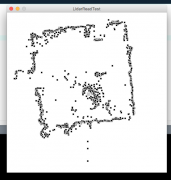
- 360 Grad LIDAR (Lidar light v1) Platform. Bis zu 100 Messungen pro Sekunde müssten möglich sein.
Features in Planung
- Indoor GPS mit Ultraschall
- Webinterface schöner machen
- Weitere Steuerungselemente für Webinterface
- Manipulator
- Manipulator für Türgriffe
- Nerf Bewaffnung
- Autonomes Fahren um Werkzeuge und Marte von Raum zu Raum zu transportieren.
[gihub.com | https://github.com/hackffm/SpaceShuttle/]
Raspi Config
install python 3.7 or greater. https://github.com/instabot-py/instabot.py/wiki/Installing-Python-3.7-on-Raspberry-Pi
mjpg-streamer installation
- Update & Install Tools
sudo apt-get update sudo apt-get upgrade -y sudo apt-get install build-essential libjpeg8-dev imagemagick libv4l-dev cmake -y
- Clone Repo in /tmp
cd /tmp git clone https://github.com/jacksonliam/mjpg-streamer.git cd mjpg-streamer/mjpg-streamer-experimental
- Make
make sudo make install
UV4L
Currently(2020/01/12) testing the UV4L WebRTC streaming.
https://www.linux-projects.org/uv4l/
curl http://www.linux-projects.org/listing/uv4l_repo/lpkey.asc | sudo apt-key add -
echo "deb http://www.linux-projects.org/listing/uv4l_repo/raspbian/stretch stretch main" | sudo tee -a /etc/apt/sources.list
sudo apt-get update
sudo apt-get install -y uv4l uv4l-raspicam uv4l-raspicam-extras uv4l-webrtc-armv6 uv4l-raspidisp uv4l-raspidisp-extras
Enabling SSL on raspberry pi running buster, little change is required:
https://blog.domski.pl/uv4l-on-raspberry-pi-running-debian-buster/
Next step, having issues with iOS Safari: https://github.com/SmallpTsai/rpi-webrtc-streaming-to-ios
Movies


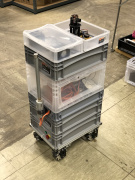
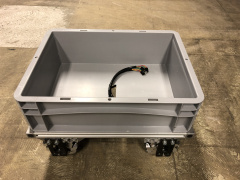
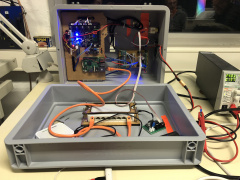
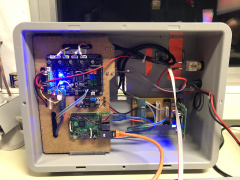
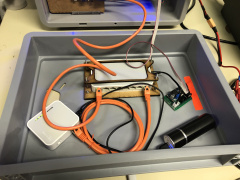
Images MK-2
- SpaceShuttle


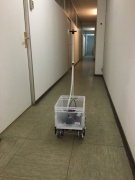
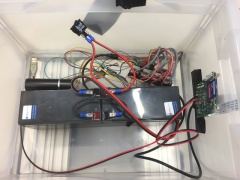
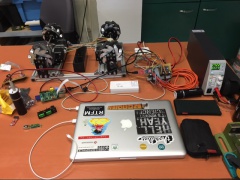
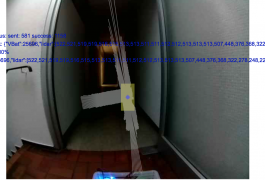
Images MK-1
- SpaceShuttle


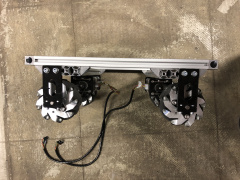
Undercarriage
- SpaceShuttle
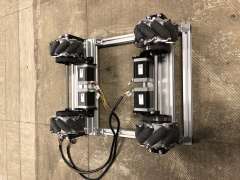
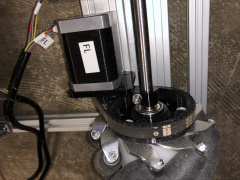
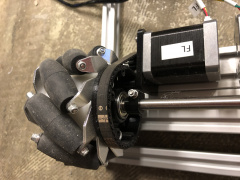
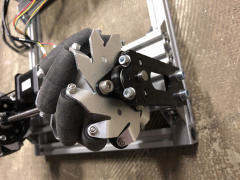


BOM
Drive stack
Elektronik Teile
- 1x Makerbase MKS GEN L 1.0
- 4x Pololu DRV8825 Stepper Motor Driver Carrier, High Current
- 1x Raspberry PI 2
- 1x DC/DC Step-Down to 5V for Raspberry PI
Undercarriage
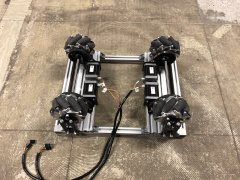
- 2x Aluminumprofil 20x20 B-type 265mm
- 2x Aluminumprofil 20x20 B-type 365mm
- 4x Aluminumprofil 20x40 B-type 305mm
- 4x Cube connector 20 B-type
- 8x Bracket 20x20 B-type
- Div schrauben und Muttern Aluminiumprofil
- 4x Nexusrobot 100mm Mechanum Räder
- 8x Kugellager für 8mm Achse
- 2x 8mm nicht rostfreie Achse
Power stack
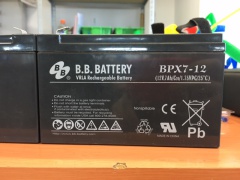
- 2x 12v Bleigel Akkus seriell verbunden um auf 24V zu kommen
Vision stack
- 1x Weitwinkel Raspberry PI Kamera
- 1x Raspberry PI 3
